
This article was created mainly so that I can refer to it whenever we discuss testing the deletion of cookies and other browser storage. It is not about the appearance of a cookie banner, but about what actually happens: what exactly occurs when data is deleted, why a simple guide is often insufficient, and where incorrect conclusions can easily be drawn during evaluation.
Disclaimer: This is not legal advice. From a technical perspective, it is possible to describe what the browser, scripts, and individual services do. However, whether a particular implementation complies with the GDPR or ePrivacy always also depends on the legal basis, transparency obligations, the scope of processing, retention periods, transfers outside the EU, and the specific configuration of the services involved.
In other words, a single DevTools screenshot or one identified cookie is usually not enough to reliably conclude that a website is “compliant” or that it “violates the GDPR.” It is only one piece of the overall puzzle.
What a proper test should achieve
To verify how a website behaves without consent, you need to reach a genuinely clean state. This does not mean merely deleting cookies. Modern websites also use other types of storage, and the page may already contain loaded scripts that recreate some of the data after it has been deleted.
In practice, you should monitor at least:
- cookies,
- Local Storage,
- Session Storage,
- IndexedDB,
- Cache Storage,
- Service Workers and potentially other active page contexts.
A simple procedure that is often insufficient
The standard recommendation is usually to open the website, delete the cookies, reload the page, and check what is created again. This is useful as a quick initial check. However, it is often insufficient as evidence that the configuration is correct or incorrect.
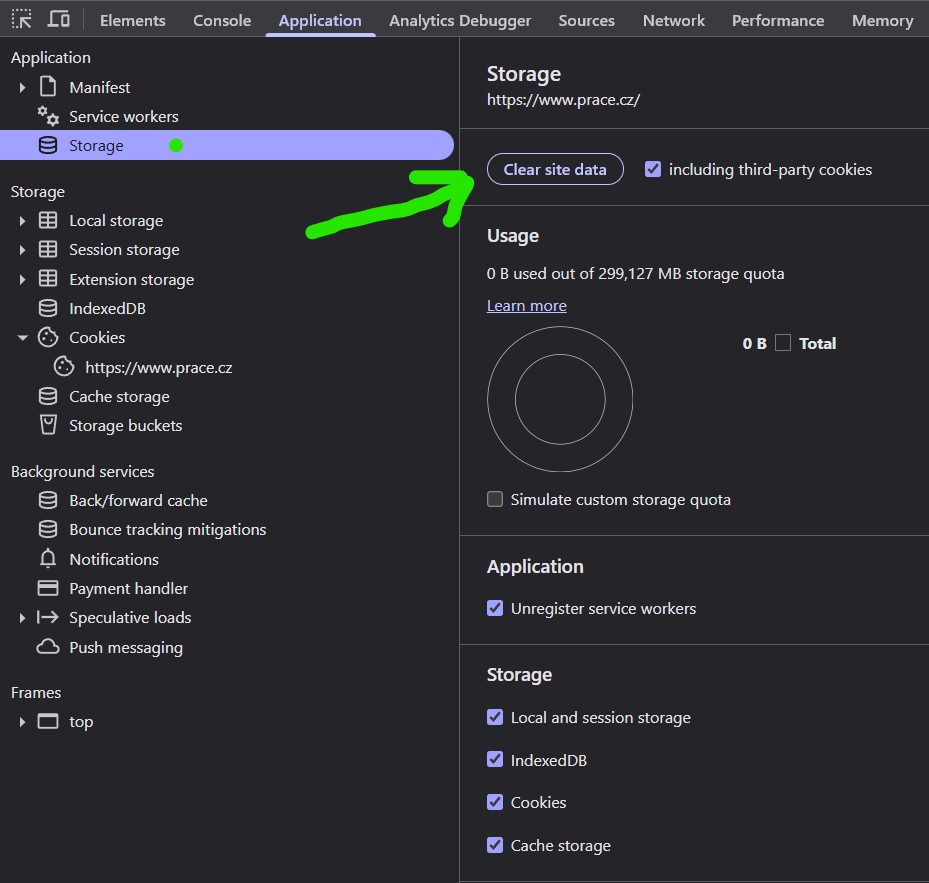
For the initial inspection, it is best to use either a clean browser profile or a private browsing window. It also makes sense to use DevTools and delete data specifically for the website being tested.
Recommended basic procedure
- Open the page you want to test.
- Open DevTools, typically by pressing
F12orCtrl+Shift+I. - Go to the
Applicationtab. - In the
Storagesection, review cookies, Local Storage, Session Storage, IndexedDB, Cache Storage, and Service Workers. - Delete the data for the website being tested. If the browser also provides an option to delete third-party data for the relevant context, use it during a more thorough inspection.
- Reload the page and observe what is created again and exactly when it happens.
Why this procedure fails in the real world
In an ideal world, everything would be created only after the page loads, deleted with a single click, and clearly understood after a refresh. In reality, websites use multiple scripts, multiple domains, multiple types of storage, and sometimes consent synchronization between services. You therefore need to account for the fact that simply saying “I deleted the cookies” does not conclusively prove anything.
A real-world scenario, step by step
1. The initial page load
During the initial page load, technical cookies and other essential data required for the website to function may be created, for example for authentication, a shopping cart, or security mechanisms. This alone does not indicate anything about marketing or analytics.
At this stage, you may also encounter a situation where the overview displays a cookie that does not belong to the domain being tested, but to another domain loaded by the page, for example through an image, iframe, or another external resource.
- Important clarification: the presence of a third-party cookie does not by itself mean that the current website created the cookie or that an analytics hit has just occurred.
- Typical reason: when making a request to an external domain, the browser sends cookies belonging to that domain if browser policies and the cookie attributes permit it, particularly the
SameSiteattribute. - Practical conclusion: if a website loads content from an external domain, the state of that external domain may also become visible during the test. This is a technical reality of the web, not automatic evidence of an error on the current website.
The website owner can reduce this risk, for example, by not loading external static files from a domain that also uses analytics or marketing cookies, or by limiting the sending of cookies in cross-site contexts through correctly configured SameSite attributes.
2. Loading the consent (“cookie”) banner and measurement scripts
Another critical moment occurs when the consent management script and measurement tags are loaded. At this stage, it is necessary to be precise and avoid both the oversimplification that “the script loaded, so it is wrong” and the opposite oversimplification that “no cookie was set, so everything is fine.”
For example, with Google Consent Mode v2, so-called cookieless pings may be sent even when consent has not been granted. Google also states that it does not store users’ IP addresses in GA4, but this is far from sufficient to automatically declare every implementation unproblematic. The decisive factors are:
- which tags are loaded,
- what exactly they send,
- whether data is stored on the user’s device without consent,
- whether additional identifying data is added beyond the standard Consent Mode configuration,
- how transparency and the legal basis are addressed.
In other words, the statement “Google Analytics loaded” is not sufficient by itself. Likewise, the statement “no cookie was created, so it is definitely legal” is also insufficient. Both are excessive simplifications.
3. The user grants consent
After consent is granted, information about the user’s choice is typically stored, and tags that were previously waiting are subsequently activated. Some scripts only update their state after consent changes. Others are loaded into the page later. Unfortunately, some are not triggered until the next pageview, which may distort analytics or advertising attribution.
This is not merely a theoretical observation. It is one of the most common reasons why a website “looks correct,” but the traffic source or the first pageview after consent is subsequently missing from the data.
4. The user deletes cookies, but the page continues running
This is where the most common testing mistake occurs. The user deletes cookies and other data in DevTools, but the page remains open and the scripts inside it continue running. Some scripts may therefore immediately create new entries, send another request, or submit an event when the user leaves the page, causing the server response to restore a cookie.
The result is deceptive: the tester believes they have “deleted everything,” but some of the data has already returned to the browser before the page has even been refreshed.
5. Why clearing the data twice sometimes helps
For more complicated implementations, it therefore makes sense to use the following procedure:
- Delete the data while the page is open.
- Reload the page so that it loads again without the previous active state.
- Check the data again and, where necessary, delete anything that was restored in the meantime.
- Only then perform the final inspection using a new, clean page load.
This is not always necessary. It is usually excessive for a simple website. However, for more complex websites involving a CMP, GTM, multiple domains, or background processes, it is often the only way to obtain a credible result.
What the consent banner itself should do correctly
If a user reduces their consent level or withdraws consent, simply changing the state stored in the consent cookie is not enough. A correct implementation should also remove all non-essential stored data that is no longer supported by the user’s consent for the relevant purpose. In practice, this mainly means analytics and marketing cookies, as well as other comparable storage.
A useful principle is simple: when consent is withdrawn, treat everything that is not technically necessary for the service to function as a candidate for deletion. For essential technical cookies, on the other hand, it is reasonable to maintain a clearly defined allowlist.
Other reasons why a test may fail
- You have multiple tabs or windows of the same website open. A script running in another tab may recreate data or send requests to the backend.
- You have multiple private browsing windows open. Until every window belonging to the private browsing session is closed, the storage may not reset as expected.
- Consent is synchronized across multiple domains. You delete the state on one domain, but another domain restores it.
- You are testing only one subdomain. A cookie set for
.example.commay remain even if you only clear data forsub.example.com. - The same cookie exists on different paths. If only the variant for
/is deleted, another cookie with the same name may remain on/app. - It is an
HttpOnlycookie. Such a cookie cannot be reliably removed using client-side JavaScript; it often needs to be deleted by the server. - Partitioned cookies and storage partitioning are involved. Third-party data may be stored separately according to the top-level website, which can make the test results confusing.
- A Service Worker or another background process is running. Even after the data has been cleared, a new request may occur and the server may return another
Set-Cookieheader. - The automated test does not use a genuinely clean environment. This typically happens when the test script reuses an old browser profile or implements only partial isolation.
Practical implications
If you still see a cookie after deleting data during a test, the correct response is not to immediately conclude that “the website is configured incorrectly.” First, verify:
- which domain the cookie originates from,
- exactly when it was created,
- whether it was created after deletion by a script that was already running,
- whether it is a technical or server-side cookie,
- whether it is being restored by another open tab, a Service Worker, or the backend.
Only then does it make sense to assess whether this is a genuine implementation problem or merely an incorrectly performed test.
Conclusion
Deleting cookies during testing is not complicated because the browser itself is inherently problematic. It is complicated because the modern web is a combination of multiple domains, multiple types of storage, multiple scripts, and often multiple legal frameworks operating simultaneously. The more complex the technology stack, the more carefully the results need to be interpreted.
If there is one point to take away from this article, it is this: “I deleted the cookies” does not yet mean “I am in a clean state,” and “I found a cookie” does not yet mean “I have evidence of a violation.”
That is precisely why testing should be performed carefully, repeatedly, and without drawing conclusions too quickly.